Everything a small practice runs on.

Pablo's got it.

Pablo drafts your note from the session and suggests the chart updates it supports. It sorts your inbox, drafts the routine replies and prepares your intake packet. You review and sign every note.

Scheduling, the client portal, payments and your website are included. Founding practices pay $59 a month and sign a BAA at signup.

Pablo is live with a small group of founding practices. Kurt sets each one up with you.

Try Pablo for 30 days. If it is not a fit, you get a full refund.

Talk about your practice

Pablo drafts your note from the session

  1. Start the sessionOpen Pablo Companion on your Mac or Windows PC and click Start Session. With your client's consent, it records and opens your Zoom, Teams or Google Meet call.
  2. Pablo drafts the noteFrom the recording, in SOAP, DAP, BIRP, GIRP or the format you use.
  3. The chart keeps upWhen the session changes something on the chart, such as a new job, an allergy or a medication change, Pablo suggests the update and shows the lines from the session that support it. You accept or skip each one before you sign.
  4. You review and signRead it, edit it and sign it.

No recording? Upload or paste a transcript, or write the note yourself.

Sample SOAP note

Draft ready

Subjective

Client reported sleeping better this week and fewer late-night worry spirals.

Objective

Engaged, on time, affect brighter than last session.

Assessment

Anxiety symptoms easing with the evening routine.

Plan

Continue the routine. Review sleep log next session.

Drafted from the session recordingReady for your review
An illustrative note for a fictional client.
What's included

A week in the practice, and what Pablo does in it

Here is what you can use today. The things not built yet are at the end.

Before a session
  • Booking linkClients pick a time from your working hours. Confirm and cancel links are in the email.
  • Portal bookingClients book, move and cancel from their portal, if you turn that on.
  • Intake packetsYou choose the documents and questions. Clients fill them in, save, come back and submit once.
  • Building the packetAnswer a few questions about your practice. Pablo lists the documents your setup calls for, recommends others, and drafts new forms from a description or a form you paste.
  • ConsentsClients sign in the portal. The signed consent stays in their chart.
  • Insurance card and documentsRequested in intake and photographed from a phone. They land on the chart.
  • Appointment remindersClients get an email reminder before each appointment. Turn reminders on in Settings.
  • ReviewYou read what came in, ask for a correction, accept it, or export it.
In the session
  • VideoClients join through the portal using your doxy.me room, Google Meet, or another video link.
  • RecordingRequest transcription when you want it and the client consents.
  • The noteUpload or paste a transcript and the draft is waiting when you finish, in SOAP, DAP, BIRP, GIRP, intake, safety plan or treatment plan. You review and sign it.
  • Writing by handEvery format works without a transcript.
After the session
  • PaymentAfter signing the note, charge the card on file at Stripe's standard rate.
  • MessagesSecure messages with attachments, both directions, answered from your inbox.
  • Outcome measuresPHQ-9, GAD-7 and others, entered by you or collected in intake, trended on the chart.
  • Insurance claimsSubmit claims from Pablo at the clearinghouse's cost.
  • Superbills and statementsDownload either from a client's chart.
  • Chart questionsAsk a question about a client. Pablo answers from the chart and shows the documents it used.
Around the week
  • Calendar syncConnect Google Calendar. Appointments kept there, including ones from Headway or Alma, show in Pablo.
  • Practice inboxPablo sorts incoming mail and drafts routine replies. Possible safety concerns go to the top for you to answer.
  • Your websiteWe build your website with you and publish it on your domain or ours. Preview changes before publishing.
  • Moving inExport from SimplePractice and import the archive in Settings. Pablo imports your client list, calendar and notes.
  • ComplianceKeep HIPAA documents together and see who accessed them. Sign in with a passkey.
Not yet
  • Paying a balance from the portalClients cannot pay an outstanding balance from their portal yet.
  • A directory or referralsPablo does not send you clients.

Your inbox, sorted before you open it

Pablo sorts the messages in your practice Gmail by topic and drafts replies to routine requests. Each draft waits in Gmail for your review.

A new-client inquiry gets a drafted reply that uses the fees, availability and insurance details you've given Pablo.

You decide how much Pablo may do for each topic:

  • File itSorted and left for you.
  • Draft for reviewThe reply is written. You read it and send it. This is the default.
  • Send itPablo sends routine replies himself. Clinical, refill and safety messages always wait for you.

Pablo uses your edits to suggest changes to future drafts. You approve each change.

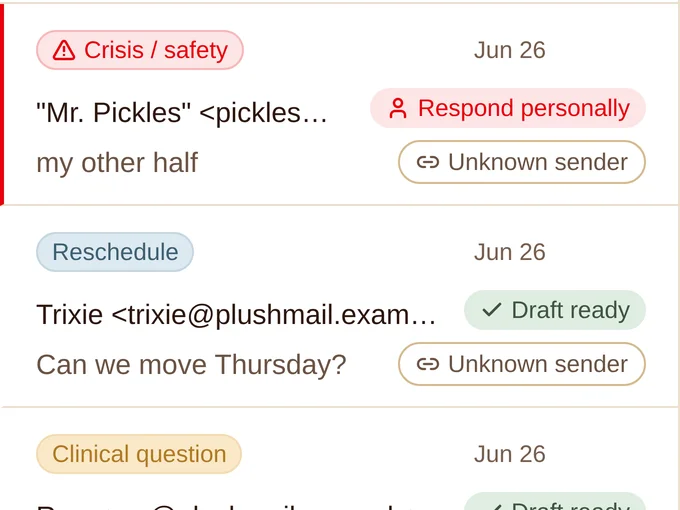
Three messages in the practice inbox: a safety message marked respond personally, a reschedule with a draft ready, and a clinical question
Sorted on arrivalThe safety message is at the top, with no draft. The reschedule has one waiting.
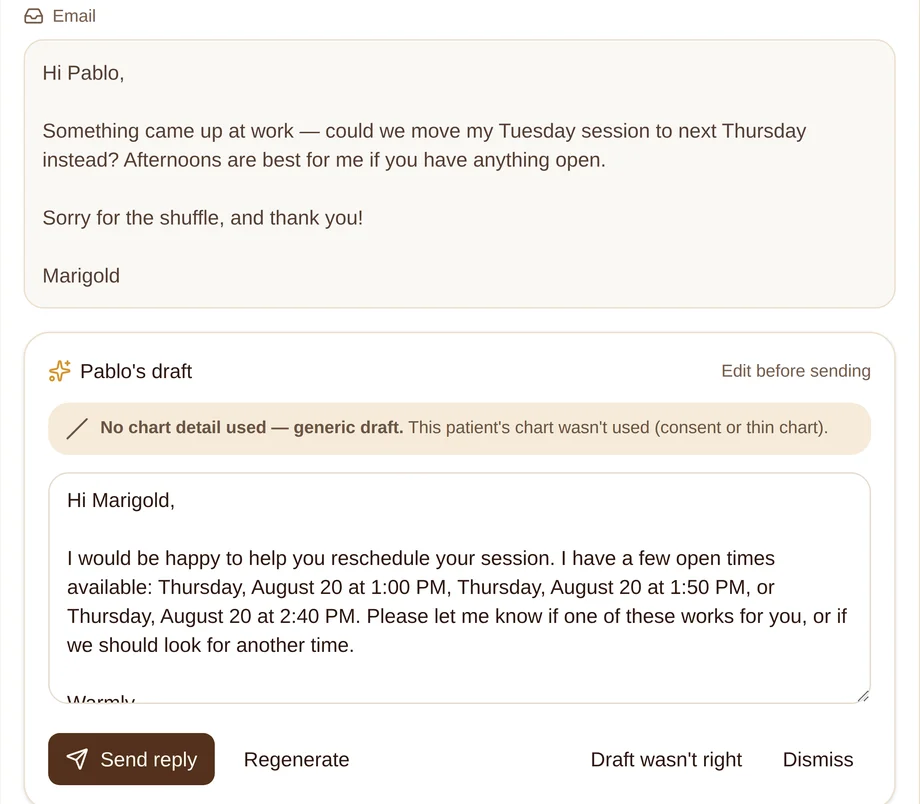
A drafted reply to a client asking to move a session, offering three open Thursday afternoon times from the clinician's calendar
Times from your real calendarA reschedule reply offers times from your calendar.

Walk through the inbox yourself, with made-up clients and a real queue.

What Pablo takes on next

When each one opens, founding members get it on the plan they already have.

Your day, from Pablo

Unsigned notes, a referral you promised, a denied claim, a refill due by Friday. Pablo puts what needs you in one place, in the gaps between sessions. When nothing does, it says so.

The phone

Pablo will answer your practice number, screen the call, then take a message or put the caller through to you.

Compare

Already on SimplePractice?

Compare the features you use today. Then try Pablo with your own practice for 30 days.

  1. ExportDownload your archive from SimplePractice.
  2. ImportUpload it in Pablo's Settings. Pablo imports your client list, calendar and notes.
  3. Keep your videoPoint the portal at the room you already use.

Work out what you pay SimplePractice today, claims and AI included.

A solo practice with AI notes, per month

SimplePractice Essential$79
Care Aide, their AI suite$59
SimplePractice$138
Pablo One, founding rate$59
AI notes, inbox, portal, websiteIncluded
Pablo$59

Prices from each vendor's own pages, verified 7 October 2026. Claims and card fees are per use for both and are set out on the comparison page.

Security you can read for yourself

Read how Pablo protects your data, records access and uses AI services on the security page.

BAA at signup

Sign the BAA when you join. Use the included mailbox or your practice Gmail.

Open-source records

The clinical record system is open source under the AGPL. Inspect it, or run it on your own cloud.

Your data stays yours

We encrypt your data and store it in the United States. We do not sell it or use it to train models.

Sixty days after you leave

Records stay readable and exportable for 60 days after cancellation, then they are deleted.

Built for a real solo practice

My sister Kendra runs a solo psychiatric practice. Administration took hours from her every week. I have built software for 30 years, so I built her a practice system.

Small practices need the same privacy and security tools as large health systems. Pablo makes them affordable for a practice of one.

The founding group is limited to twenty practices. Each one works directly with me, and what they ask for shapes what gets built next.

Kurt Niemi, founder and developer

Pricing

One plan. $59 a month for the first twenty practices.

Pablo has one plan, with AI included. Founding practices pay $59 a month while they keep the plan. The regular price is $79.

Pablo One

$59 a month

Founding rate for the first 20 practices. $79 a month after that. 30-day money-back guarantee.

Become a founding member
  • Calendar, online booking and Google Calendar sync
  • Client portal with intake, consents and secure messaging
  • Clinical notes from a transcript in seven formats
  • Client charts, outcome measures and chart questions
  • Card payments at Stripe's rate, nothing added
  • Practice inbox with drafted replies
  • Your practice website, built with you
  • HIPAA-eligible mailbox and BAA
  • Credentialing with two payers, founding practices
  • A direct line to the person who writes Pablo

Usage. Notes from uploaded or pasted transcripts are unlimited. Recording a session includes 50 sessions a month, then 40 cents each. You pay our cost for claims and for any insurance panel beyond the two included. Carrier charges for text messages are passed through without markup.

Questions, answered plainly

What does Pablo cost?

$59 a month for the first 20 practices, for as long as they keep the plan. After that, Pablo One is $79 a month. There is one plan, with AI included. Try Pablo for 30 days. If it is not a fit, you get a full refund.

Can I keep using Headway, Alma or Rula?

Yes. Many therapists see some clients through a network and some on their own. Pablo's calendar, notes, charts and inbox work alongside the network, and the network keeps handling the clients it covers.

Does Pablo have video sessions?

Use the video service you already have. Clients join through a room link in the portal. Doxy.me's free individual plan includes a BAA.

Can I move my practice from SimplePractice?

Yes. Export your data from SimplePractice and import the archive in Pablo's Settings. Your clients, calendar and notes come across. You can do this during the 30-day window and decide with your own practice in front of you.

Is there a Business Associate Agreement?

Yes. You sign the BAA during signup. The plan includes a HIPAA-eligible mailbox, or you can use your practice Gmail.

Do I have to use the AI features?

No. Notes can be written by hand, and the calendar, portal, payments and website work without AI.

Does Pablo bill insurance?

Yes. Pablo submits claims at the clearinghouse's cost. Founding practices also get two insurance panels included, under their own NPI.

What happens to my records if I cancel?

Your records stay available to read and export for 60 days after you cancel. After that they are deleted.

Who builds Pablo?

Kurt Niemi has built software for 30 years. He started Pablo for his sister's solo psychiatric practice. Pablo's clinical record code is open source, so anyone can read it.

Pablo Bear

Run the practice from one place.

Founding practices pay $59 a month. The regular price is $79. Try Pablo for 30 days with a full refund and $25 for lunch.

Fifteen minutes on my calendar, or email kurtn@pablo.health.